You checked Google Search Console.
The page says “Indexed.”
But when you search your target keyword, the page is nowhere.
This is frustrating, but it is not unusual.
It happens because indexing and ranking are not the same thing.
Indexed means Google may know your page exists and may have stored it in its index. Ranking means Google sees enough reason to show that page for a specific search query.
That second part is where most websites fail.
Google Search works through different stages: crawling, indexing, and serving search results. Google explains this clearly in its official guide on How Google Search Works. A page being indexed only means it has crossed one stage. It does not mean Google will automatically show it for competitive keywords.
That is the real issue.
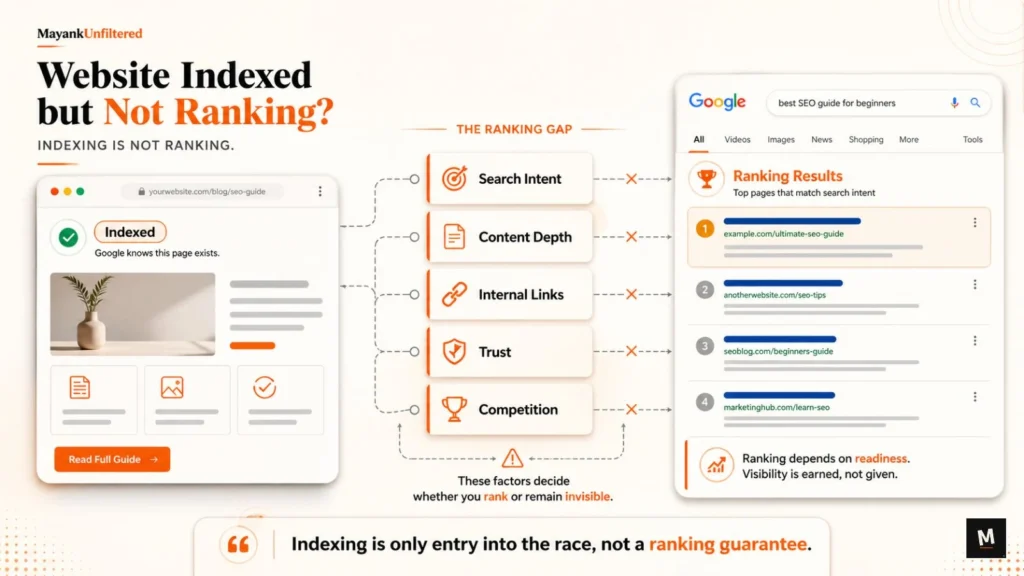
Your page may be indexed, but it may not be ready to rank.
It may have weak content, poor intent match, unclear headings, no internal links, weak trust signals, no topical support, or simply stronger competitors above it.
If your page is indexed but not ranking, your problem is no longer only about visibility access.
It is about ranking readiness.
Quick Answer: Why Is My Website Indexed but Not Ranking?
Your website may be indexed but not ranking because the page does not match search intent strongly enough, the content is too thin or generic, the page lacks internal links, Google does not see enough trust or authority, competitors have stronger pages, or the keyword is too competitive for the page’s current strength.
Indexing only means Google has processed or stored the page.
It does not mean the page deserves visibility for every keyword you want.
A page can be indexed and still fail because:
- the page answers the wrong search intent
- the content is not useful enough
- the page is too generic
- the keyword is not clearly mapped to the page
- internal linking is weak
- the page has no proof
- competitors have better pages
- the website has no topical support
- technical or quality issues are holding it back
Google’s SEO Starter Guide explains that SEO is about helping search engines understand your content and helping users find your site through search.
That is the point.
Ranking is not only about being indexed.
Ranking depends on whether Google can clearly understand the page and whether the page is useful enough for the searcher.
First, Understand the Difference Between Indexed and Ranking
Before fixing the problem, understand the difference clearly.
Many business owners see “Indexed” in Search Console and think the SEO work is done.
It is not.
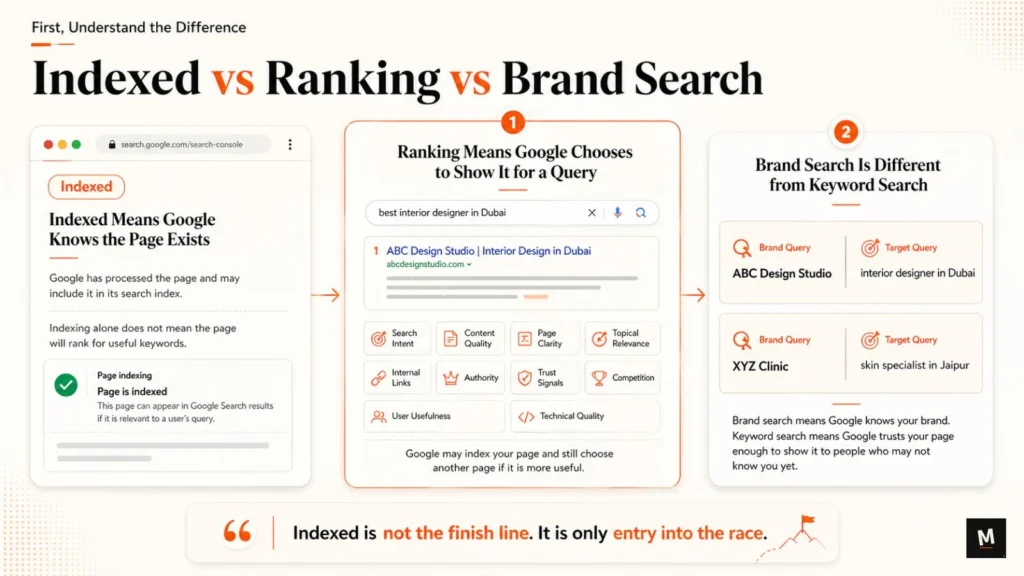
Indexed is not the finish line.
It is only entry into the race.
Indexed Means Google Knows the Page Exists
Indexed means Google has processed the page and may include it in its search index.
That is important.
If a page is not indexed, it usually cannot appear in search results.
But indexing alone does not mean the page will rank for useful keywords.
Think of indexing like getting your name added to a list.
Ranking is being selected from that list when someone searches.
Those are two different things.
Ranking Means Google Chooses to Show It for a Query
Ranking means Google decides your page is relevant and useful enough to show for a search query.
This depends on:
- search intent
- content quality
- page clarity
- topical relevance
- internal links
- authority
- trust signals
- competition
- user usefulness
- technical quality
Google may index your page and still decide another page is better for the searcher.
That does not mean Google is ignoring you.
It means your page is not strong enough for that query yet.
Brand Search Is Different from Keyword Search
A page may appear when someone searches your brand name.
But that does not mean the page ranks for service keywords.
Example:
Brand query: “ABC Design Studio”
Target query: “interior designer in Dubai”
Another example:
Brand query: “XYZ Clinic”
Target query: “skin specialist in Jaipur”
These are different searches.
Brand search means Google knows your brand.
Keyword search means Google trusts your page enough to show it to people who may not know you yet.
That is where the real SEO challenge starts.
9 Reasons Your Indexed Page Is Not Ranking
1. The Page Does Not Match Search Intent
Search intent means what the searcher actually wants.
This is one of the biggest reasons indexed pages do not rank.
A page may be indexed, but if it does not satisfy the intent behind the keyword, Google has no strong reason to show it.
Example:
If someone searches: “best interior designer in Dubai”
They are probably not looking for a generic homepage with three lines of brand copy.
They may want:
- location relevance
- portfolio
- service details
- design style
- process
- project examples
- testimonials
- FAQs
- consultation information
If your page does not provide these things, it may not match the intent strongly enough.
What to check:
- Does the page answer the exact query?
- Is the intent informational, commercial, local, or transactional?
- Are top-ranking pages more complete?
- Is your page trying to rank for too many different intents?
- Does your page help the user take the next step?
Unfiltered line:
If the page answers the wrong question, indexing will not save it.
A page ranking for “interior design cost in Dubai” may need pricing context.
A page ranking for “luxury interior designer in Dubai” may need premium positioning, portfolio, trust, and process.
A page ranking for “interior design ideas” may need educational content.
Same niche.
Different intent.
Different page requirement.
2. The Content Is Too Thin or Generic
Thin content does not give enough useful information.
Generic content says what every competitor says.
This is common on service business websites.
The page may say:
“We provide high-quality services.”
“Our expert team helps clients.”
“Contact us for more details.”
That is not enough.
Google does not need another vague page.
It needs a useful page that helps the searcher make a decision.
Google’s official guide on creating helpful, reliable, people-first content explains that content should be useful, reliable, and created for people first.
For service pages, helpful content means the page should clearly explain:
- what the service is
- who it is for
- what problem it solves
- what your process looks like
- what makes your approach different
- what proof you have
- what questions buyers usually ask
- what the next step is
Generic content does not build confidence.
It does not help Google understand your value.
And it does not help serious buyers trust you.
What to check:
- Is the page only 300–500 words with basic claims?
- Does it explain the service properly?
- Does it answer buyer questions?
- Does it show examples or proof?
- Does it sound different from competitors?
- Does it include real context or only marketing lines?
Weak page example:
“We are a leading interior design company offering modern design solutions for homes and offices.”
Better page example:
“We help luxury homeowners in Dubai plan full-home interior design projects, including space planning, material selection, 3D design, execution coordination, and handover support. Our process is built for clients who want a premium design outcome without managing multiple vendors.”
The second version is clearer.
Google can understand it better.
The buyer can trust it faster.
3. The Page Has Weak Keyword-to-Page Alignment
Many websites target a keyword, but the page itself is not clearly built around that keyword’s meaning.
This is a silent problem.
The website owner may say:
“I want this page to rank for interior design services, modular kitchen design, luxury home interiors, villa interiors, office interiors, and interior designer in Dubai.”
That is too much for one page.
One page cannot carry every keyword properly.
If one page is trying to rank for everything, Google may not trust it for anything specific.
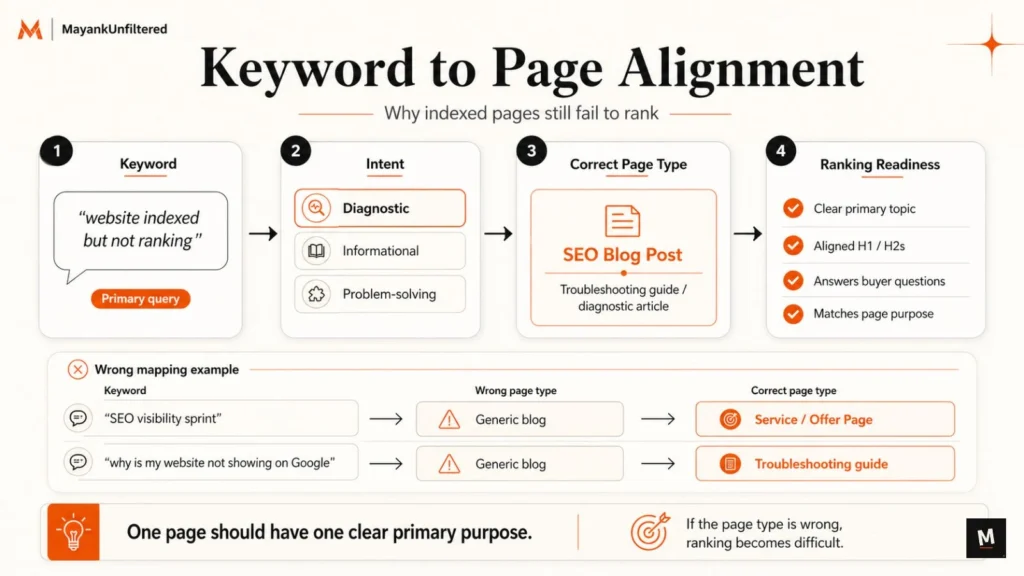
Good SEO needs keyword-to-page mapping.
That means one page should have one clear primary topic.
Supporting keywords can be included naturally, but the page needs a clear main purpose.
What to check:
- Is there one clear primary topic?
- Is the H1 aligned with the page intent?
- Do H2s and H3s support the main topic?
- Does the page answer related buyer questions?
- Is the target keyword mapped to the right page type?
- Are you trying to rank a homepage for a keyword that needs a service page?
- Are you trying to rank a service page for a keyword that needs a blog?
Example:
Keyword: “website indexed but not ranking”
Best page type: A diagnostic SEO blog post like this one.
Keyword: “SEO visibility sprint”
Best page type: A service/offer page like the 14-Day SEO Visibility Sprint.
Keyword: “why is my website not showing on Google”
Best page type: A troubleshooting guide like why your website is not showing on Google.
The page type matters.
If the page type is wrong, ranking becomes difficult.
4. Internal Linking Is Weak
Internal links help Google and users understand which pages matter.
If an important page is barely linked inside your own website, why should Google treat it as important?
Google’s link best practices explain that links help Google find pages on your site and that descriptive anchor text helps users and Google understand what the linked page is about.
This is why internal linking matters.
If a page is indexed but not ranking, check whether your own website supports that page properly.
What to check:
- Is the page linked from the homepage?
- Is it linked from relevant service pages?
- Is it linked from related blogs?
- Is it linked from a category or hub page?
- Is the anchor text descriptive?
- Is the page buried too deep?
- Are important pages connected to each other?
Good anchor examples:
- SEO visibility sprint
- service page SEO audit
- interior design SEO strategy
- website visibility scorecard
- Google indexing checklist
Bad anchor examples:
- click here
- read more
- learn more
- this page
- more info
Generic anchors are weak because they do not explain context.
Descriptive anchors help Google understand relationships between pages.
Unfiltered line:
If an important page has weak internal links, you are asking Google to value a page your own website barely supports.
For example, if your blog post explains why pages are indexed but not ranking, it should link to relevant next-step pages like the free Website Visibility Scorecard or a deeper manual review offer like the 14-Day SEO Visibility Sprint.
Internal linking is not decoration.
It is structure.
5. The Page Has No Clear Trust Signals
For service businesses, ranking is not only about text.
The page needs proof.
A service page without proof feels incomplete.
Google may understand the topic, but the buyer still needs confidence.
Trust signals include:
- reviews
- testimonials
- case studies
- portfolio
- real examples
- founder or team details
- business information
- process explanation
- FAQs
- location relevance
- project photos
- credentials
- client logos where appropriate
If competitors show proof and your page only makes claims, competitors have the stronger page.
This is especially important for premium service businesses.
A luxury interior designer cannot rely only on beautiful words.
A clinic cannot rely only on “experienced doctors.”
A consultant cannot rely only on “we help businesses grow.”
You need proof.
What to check:
- Does the page show client results or examples?
- Does it include testimonials?
- Does it explain your process?
- Does it show real project photos or case studies?
- Does it mention who is behind the service?
- Does it include business details?
- Does it answer doubts before the buyer asks?
Trust is not a design element.
Trust is part of ranking readiness.
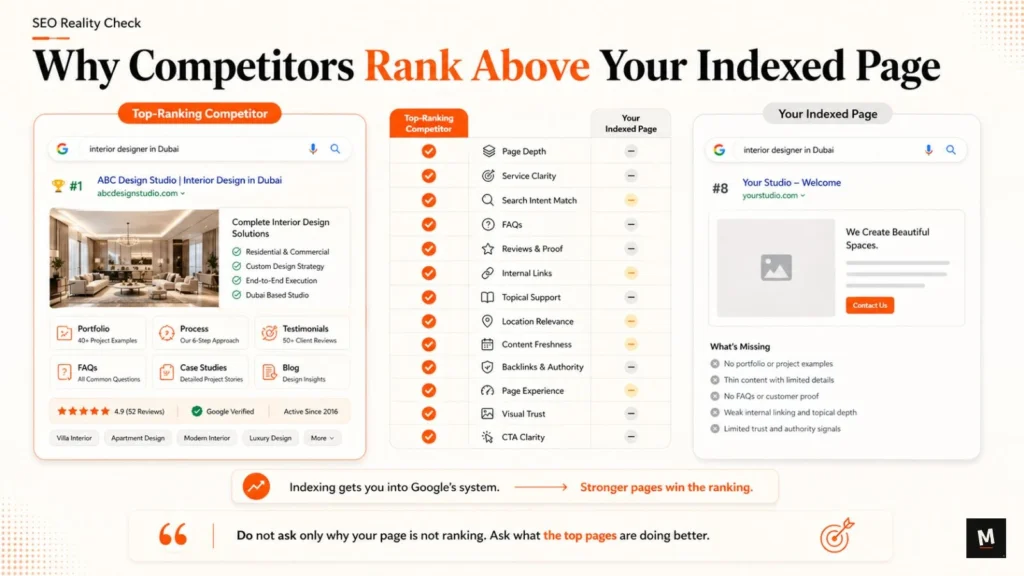
6. The Competitors Have Stronger Pages
Sometimes your page is indexed and technically fine.
But competitors still rank because their pages are stronger.
This is where you need to stop asking: “Why is my page not ranking?”
And start asking: “What are the top-ranking pages doing better?”
Do not copy competitors.
Study what makes their pages more useful, then build a better, more specific page.
What to compare:
- page depth
- service clarity
- search intent match
- FAQs
- reviews and proof
- internal links
- topical support
- location relevance
- content freshness
- backlinks and authority
- page experience
- visual trust
- CTA clarity
Example:
If the top-ranking pages for “best interior designer in Dubai” include portfolios, location-specific service copy, testimonials, design process, FAQs, and project examples, and your page only has a short homepage section, you are not competing properly.
Indexing only gets your page into Google’s system.
It does not make your page better than the pages already ranking.
7. Your Website Lacks Topical Support
A single service page may struggle if the website has no supporting content around the topic.
This is common with new websites.
You create one service page and expect it to rank.
But Google may need more context.
Supporting content helps Google understand your expertise and helps users move through related questions.
Example:
A page targeting “SEO consultant for service businesses” can be supported by blogs on:
- why service pages do not rank
- website indexed but not ranking
- search clarity problems
- internal linking for service pages
- trust signals for service websites
- why your website is not showing on Google
- how to diagnose Google visibility issues
Each supporting article should internally link back to the relevant service page, tool page, or sprint page.
This builds topical depth.
It also improves user journey.
A buyer may first search: “why is my website not showing on Google”
Then later search: “website indexed but not ranking”
Then they may need a diagnostic tool or manual review.
That is why content should not exist randomly.
It should support a clear business path.
If you want to connect this article with the previous stage, naturally link to your guide on why your website is not showing on Google.
Then guide serious readers toward the Website Visibility Scorecard.
That is a stronger content system than publishing isolated posts.
8. The Keyword Is Too Competitive for the Page’s Current Strength
Some keywords are simply harder.
Examples:
- best interior designer in Dubai
- SEO consultant
- digital marketing agency
- dentist near me
- luxury interior designer
- app development company
These keywords usually need stronger pages, stronger proof, better authority, better internal support, and often backlinks.
If your page is weak and the keyword is competitive, indexing only puts you in the race.
It does not make you competitive.
What to do:
- Start with more specific long-tail keywords
- Improve page depth
- Build internal links
- Add proof and examples
- Add supporting content
- Improve page experience
- Strengthen authority over time
- Target location or niche-specific intent
Example:
Instead of only targeting: “interior designer in Dubai”
You may also support it with:
“luxury villa interior design in Dubai”
“turnkey interior design services in Dubai”
“apartment interior designer in Dubai”
“premium home interior design Dubai”
Long-tail keywords are not weak.
They are often more specific and more buyer-aware.
For new or developing websites, this can be the smarter path.
9. Technical or Quality Issues Are Holding the Page Back
Even if the page is indexed, technical or quality issues can reduce visibility.
Indexing does not mean the page is technically perfect.
Possible issues include:
- slow page speed
- poor mobile layout
- duplicate content
- canonical problems
- broken internal links
- poor heading structure
- heavy scripts
- thin template pages
- confusing site architecture
- weak Core Web Vitals
- pages blocked in unexpected ways
- outdated content
Google Search Console’s Page Indexing report can surface indexing-related problems, including pages blocked by robots.txt or marked noindex.
Even when a page is indexed, it is still worth checking technical signals.
What to check:
- Is the page mobile-friendly?
- Does it load quickly?
- Are internal links working?
- Are canonicals correct?
- Are headings logical?
- Are images optimized?
- Is content duplicated across multiple pages?
- Is the page buried too deep inside the site?
Do not overcomplicate this.
A technically poor page can still be indexed.
But if the competition is strong, technical weakness can reduce your ability to compete.
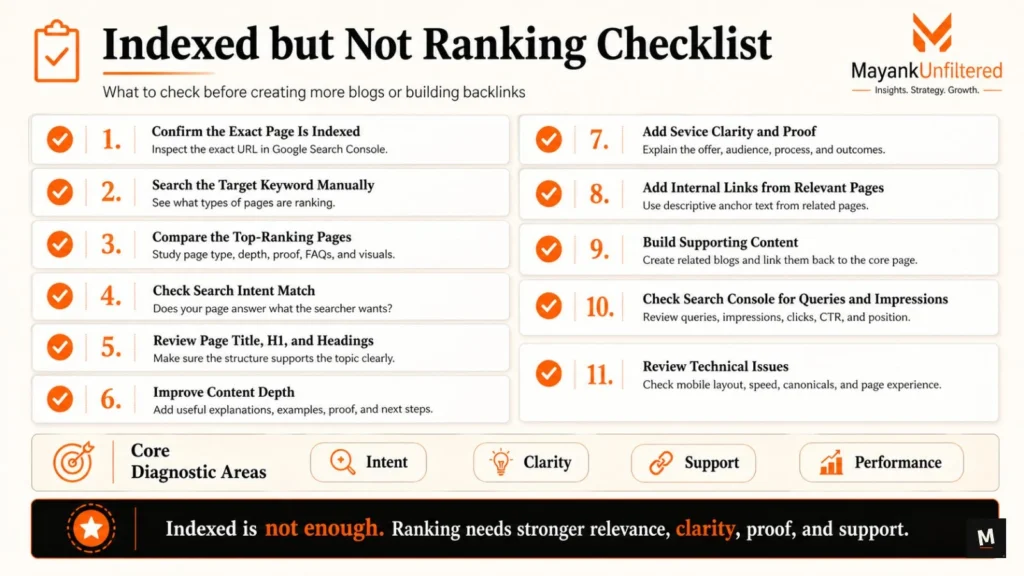
What to Check First If Your Page Is Indexed but Not Ranking
Before creating more blogs or building backlinks, run this checklist.
1. Confirm the Exact Page Is Indexed
Do not assume the page is indexed.
Open Google Search Console and inspect the exact URL.
Check whether Google says the URL is indexed and eligible to appear in search.
2. Search the Target Keyword Manually
Search your target keyword in Google.
Check what type of pages are ranking.
Are they blogs, service pages, location pages, directories, category pages, videos, or comparison pages?
This helps you understand what Google thinks the intent is.
3. Compare the Top-Ranking Pages
Open the top 5–10 ranking pages.
Compare:
- page type
- heading structure
- content depth
- service clarity
- proof
- FAQs
- internal links
- visuals
- trust signals
- location relevance
Do not copy.
Diagnose the gap.
4. Check Search Intent Match
Ask:
Does my page answer what the searcher wants?
If the intent is commercial and your page is educational, it may not rank.
If the intent is local and your page has no location relevance, it may not rank.
If the intent is comparison-based and your page only talks about your brand, it may not rank.
5. Review Page Title, H1, and Headings
Your page title, H1, and headings should clearly support the primary topic.
Check:
- Is the title specific?
- Is the H1 aligned with the keyword?
- Do H2s cover useful subtopics?
- Are headings written for readers, not just keywords?
- Is the page structure easy to scan?
6. Improve Content Depth
Add useful details.
Do not add words just to make the page longer.
Add:
- clear explanations
- examples
- process details
- buyer questions
- objections
- proof
- comparisons
- next steps
Depth means usefulness, not word count.
7. Add Service Clarity and Proof
For service pages, explain:
- what you offer
- who it is for
- what problem it solves
- what your process looks like
- why someone should trust you
- what result or outcome they can expect
Then add proof.
Reviews, portfolio, testimonials, client examples, or project results can make the page stronger.
8. Add Internal Links from Relevant Pages
Find relevant pages on your own website and link to the indexed page.
Use descriptive anchor text.
For example:
Instead of:
“click here”
Use:
“manual SEO visibility review”
or:
“Website Visibility Scorecard”
or:
“service page SEO audit”
Internal links help Google understand importance and context.
9. Build Supporting Content
One page is rarely enough for competitive topics.
Build supporting blogs around related problems.
Example support topics:
- why your website is not showing on Google
- how to improve service page SEO
- internal linking for service business websites
- trust signals for SEO
- why service pages do not rank
- website visibility checklist
Then link those supporting blogs back to the core page.
10. Check Search Console for Queries and Impressions
Search Console can show whether the page is getting impressions.
If the page has impressions but low clicks, your title or meta description may be weak.
If the page has no impressions, Google may not see it as relevant enough for target queries.
Check:
- queries
- impressions
- average position
- clicks
- CTR
- page-level performance
11. Review Technical Issues
Check whether technical issues are limiting performance.
Review:
- mobile layout
- page speed
- broken links
- canonical tags
- duplicate content
- heading structure
- indexability
- sitemap inclusion
- page experience
When a Manual SEO Visibility Review Makes Sense
A manual review makes sense when the basic checks are not enough.
Use a manual SEO visibility review if:
- important pages are indexed but not getting impressions
- pages get impressions but no clicks
- service pages exist but do not rank
- competitors rank with stronger pages
- you do not know whether the issue is content, internal linking, authority, or trust
- you keep publishing but nothing improves
- your homepage ranks for brand name but not for service keywords
- your website looks good but does not generate search visibility
This is where random SEO becomes expensive.
If the page does not match intent, more backlinks will not fix the core problem.
If the content is too generic, publishing more generic content will not help.
If service pages have no proof, design alone will not build trust.
The 14-Day SEO Visibility Sprint is built for business owners who want to understand what is blocking their Google visibility and what to fix first.
It reviews discovery, indexing readiness, search clarity, service page strength, internal linking, content depth, and trust signals.
Final Takeaway
An indexed page is not a successful page yet.
Indexing only means Google may know the page exists.
Ranking needs stronger relevance, clearer intent, better content, internal support, proof, trust, and competitiveness.
If your page is indexed but not ranking, do not jump straight into more blogs or backlinks.
First check whether the page deserves visibility.
Ask:
- Does it match search intent?
- Is the content useful enough?
- Is the keyword mapped to the right page?
- Does the page have internal links?
- Does it show proof?
- Are competitors stronger?
- Does the site have topical support?
- Is the keyword too competitive?
- Are technical issues holding it back?
Before creating more blogs or backlinks, check whether your page has the clarity, structure, and trust needed to deserve visibility.
Use the free Website Visibility Scorecard to diagnose your visibility issue.
If you want a deeper manual review, explore the 14-Day SEO Visibility Sprint.
FAQs
Why is my page indexed but not ranking?
Your page may be indexed but not ranking because it does not match search intent, has thin or generic content, lacks internal links, shows weak trust signals, has no topical support, or is targeting a keyword that is too competitive for its current strength.
Does indexing guarantee ranking?
No. Indexing does not guarantee ranking. Indexing only means Google may have processed or stored the page. Ranking depends on relevance, usefulness, trust, authority, competition, and how well the page matches the search query.
How do I know if my page is indexed?
Use Google Search Console’s URL Inspection Tool. Enter the exact page URL and check whether Google says the URL is indexed and eligible to appear in search.
Why does my page rank for my brand name but not my target keyword?
Brand search and keyword search are different. Your page may appear for your brand name because Google knows your website exists, but it may not rank for target keywords because the page lacks search intent match, content depth, trust, or authority.
Should I build backlinks if my indexed page is not ranking?
Not immediately. First check search intent, page quality, internal links, content depth, trust signals, and competitor strength. Backlinks can help, but they cannot fix a weak or unclear page.
Can internal links help an indexed page rank?
Yes. Internal links help Google discover pages, understand page relationships, and identify which pages are important. Use descriptive anchor text and link important pages from relevant blogs, service pages, and the homepage.
What should I check first when a page is indexed but not ranking?
Start with search intent, competitor comparison, page title, H1, content depth, internal links, trust signals, supporting content, Search Console queries, and technical issues.