Most business owners ask one direct question:
“Why is my website not showing on Google?”
But the better question is:
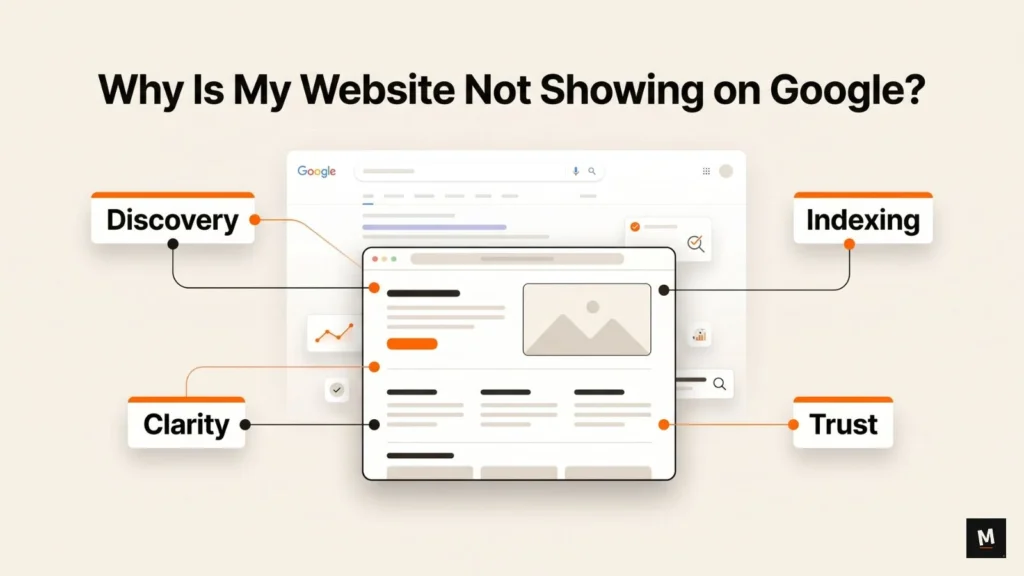
Can Google discover, index, understand, and trust your website?
Because a website going live does not mean it will automatically appear in Google Search.
Google Search works through three broad stages: crawling, indexing, and serving. Google first needs to find your pages, then process them, then decide when they are relevant enough to show for a search query. Google also clearly says that it does not guarantee every page will be crawled, indexed, or served in search results. You can read Google’s own explanation here: How Google Search Works.
So if your website is not showing on Google, do not start with more blogs, backlinks, or a redesign.
First, find where the visibility chain is breaking.
Quick Answer: Why Your Website Is Not Showing on Google
Your website may not be showing on Google because Google has not discovered it yet, cannot crawl it properly, has not indexed important pages, or is blocked by settings like noindex or robots.txt.
In some cases, Google can see your website but does not understand it clearly enough to rank it for buyer-intent keywords.
In other cases, your website may be indexed but still not visible for useful searches because the pages are weak, generic, poorly linked, or missing trust signals.
New websites may also take time to appear. Google says it can take time to index a new page and recommends allowing at least a week after submitting a sitemap or indexing request before assuming there is a problem. You can check the official Google help page here: Why is my page missing from Google Search?.
But waiting is not always the answer.
You still need to check whether your website is:
- discoverable
- crawlable
- indexable
- clearly structured
- useful
- trustworthy
That is the real starting point.
First, Understand the Difference Between Showing, Indexing, and Ranking
Many business owners confuse three different things:
Showing on Google.
Indexed by Google.
Ranking on Google.
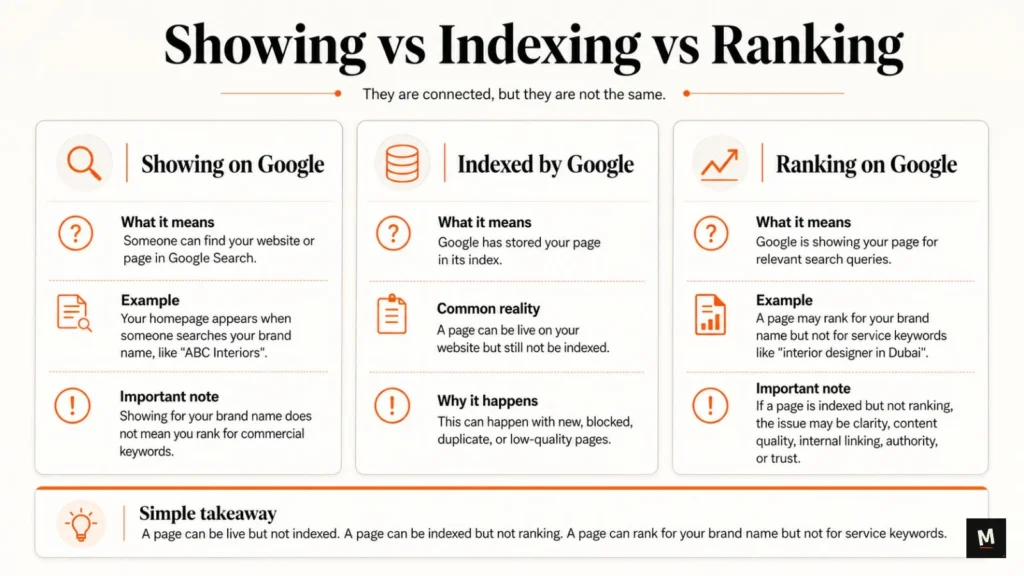
They are connected, but they are not the same.
Showing on Google
Showing on Google means someone can find your website or page in Google Search.
For example, if someone searches your brand name and your homepage appears, your site is showing for that brand query.
But that does not mean your site is ranking for commercial keywords.
A website can show for:
“ABC Interiors”
But still not show for:
“interior designer in Dubai”
That is a very different problem.
Indexed by Google
Indexed means Google has stored your page in its index.
A page can be live on your website but not indexed by Google.
This is common with new pages, blocked pages, duplicate pages, low-quality pages, or pages that Google has discovered but decided not to include in its index.
Google’s Page Indexing report in Search Console helps you understand which pages Google can find and index, and which pages have indexing problems.
Ranking on Google
Ranking means Google is showing your page for relevant search queries.
A page can be indexed but still not rank.
A page can also rank for your brand name but not for your service keywords.
This is important.
If your website is indexed but not ranking, the issue is probably not basic indexing. It may be content clarity, page quality, internal linking, authority, or trust.
Here is the simple version:
A page can be live but not indexed.
A page can be indexed but not ranking.
A page can rank for your brand name but not for service keywords.
Once you understand this difference, troubleshooting becomes much easier.
11 Reasons Your Website Is Not Showing on Google
1. Your Website Is Too New
If your website is new, Google may not have discovered and indexed it yet.
This is normal.
A new website does not instantly appear in Google just because it is published. Google needs time to find the website, crawl the pages, process the content, and decide what should be indexed.
But here is the practical point:
Time alone does not fix poor setup.
If your website has no sitemap, no internal links, no Search Console setup, and weak pages, waiting will not magically solve the problem.
What to check:
- Is your website live?
- Is your website accessible without a password?
- Is Google Search Console connected?
- Is your sitemap submitted?
- Are your important pages accessible?
- Have you inspected your homepage in Search Console?
Use Google’s URL Inspection Tool to check whether Google knows about a specific page and whether that page may be indexable.
If your website is new, first give Google enough time.
Then check the setup.
Do not guess.
2. Google Has Not Discovered Your Website Yet
If Google does not know your page exists, it cannot show it in search.
This is one of the most basic reasons a website does not appear on Google.
Google usually discovers pages through:
- internal links
- external links
- XML sitemaps
- previously known pages
- submitted URLs in Search Console
If your website is new and no page links to it properly, Google may take longer to discover it.
What to check:
- Search
site:yourdomain.com - Submit your sitemap in Google Search Console
- Link important pages from the homepage
- Add service pages to the menu or footer
- Link related blogs to relevant service pages
- Make sure important pages are not orphaned
An orphaned page is a page that exists but is not linked from anywhere important.
That is a problem.
If Google cannot find your pages, keyword optimization is not the first issue.
Discovery is.
3. Your Pages Are Not Indexed
A page can exist on your website and still not be indexed by Google.
This is where many business owners get confused.
They say:
“My page is live. Why is it not on Google?”
Because live does not mean indexed.
Google may not index a page because:
- the content is too thin
- the page is duplicate
- the page has a noindex tag
- the page is blocked
- the page has technical issues
- Google does not see enough value in indexing it
- the page is discovered but not crawled yet
- the page is crawled but not indexed yet
What to check:
- Open Google Search Console
- Go to Page Indexing report
- Check indexed and non-indexed URLs
- Inspect important URLs manually
- Check sitemap status
- See whether important pages are submitted and indexed
For one specific page, use the URL Inspection Tool.
It can show whether the URL is on Google, whether Google has crawled it, and whether the page may be indexable.
If your important service pages are not indexed, fix that before thinking about rankings.
4. Your Website or Page Has a Noindex Tag
A noindex tag tells search engines not to index a page.
This is useful for private pages, thank-you pages, duplicate pages, or low-value pages.
But if noindex is accidentally added to your homepage, service page, blog post, or landing page, that page may not appear in Google Search.
Google’s official documentation explains that the noindex rule can prevent a page from appearing in search results.
This mistake is common in WordPress.
Sometimes the whole website is accidentally discouraged from indexing.
Sometimes one page is set to noindex inside an SEO plugin.
Sometimes staging settings are moved to the live website.
What to check:
- WordPress Reading Settings
- Rank Math page-level robots settings
- SEO plugin global robots settings
- Page source code
- Search Console URL Inspection result
In WordPress, check:
Settings → Reading → Search engine visibility
Make sure this option is not enabled:
“Discourage search engines from indexing this site”
Also check your Rank Math settings on each important page.
If your page is accidentally set to noindex, change it to index, update the page, and request indexing in Search Console.
5. Robots.txt May Be Blocking Access
Robots.txt tells search engine crawlers which URLs they can access.
But robots.txt is often misunderstood.
Google says robots.txt is mainly used to control crawler access. It is not the right method to keep a page out of Google Search. If you want to keep a page out of Google, use noindex or password protection. You can read Google’s official explanation here: Robots.txt Introduction and Guide.
Still, robots.txt can create visibility problems when important pages or folders are accidentally blocked.
For example, a bad robots.txt rule can stop Google from crawling parts of your website.
What to check:
- Open
yourdomain.com/robots.txt - Check if important folders are blocked
- Check if
/is blocked - Check Search Console for crawl warnings
- Test important URLs using URL Inspection
A simple example of a dangerous robots.txt issue:
Disallow: /
This can block crawlers from accessing your entire website.
Do not edit robots.txt blindly.
If you are not sure, get it checked before making changes.
6. Your Sitemap Is Missing or Not Submitted
A sitemap helps Google discover important URLs on your website.
It does not guarantee ranking.
It does not guarantee indexing.
But it helps discovery.
If your sitemap is missing, broken, or not submitted in Search Console, Google may take longer to find your important pages.
This matters especially for:
- new websites
- websites with many pages
- websites with poor internal linking
- service businesses with multiple service pages
- location-based websites
- blogs with many posts
What to check:
- Does your website have an XML sitemap?
- Is your sitemap submitted in Google Search Console?
- Is sitemap status showing success?
- Are important pages included in the sitemap?
- Are noindex pages excluded from the sitemap?
- Are old or broken URLs still inside the sitemap?
If you use Rank Math, your sitemap is usually available at:
yourdomain.com/sitemap_index.xml
Open it and check whether your important pages are included.
If your service pages are not inside the sitemap, Google may still find them through links, but you are making discovery harder.
7. Important Pages Are Orphaned
Orphaned pages are pages that exist on your website but are not internally linked from important pages.
This is a silent SEO problem.
The page may be published.
The page may be inside the sitemap.
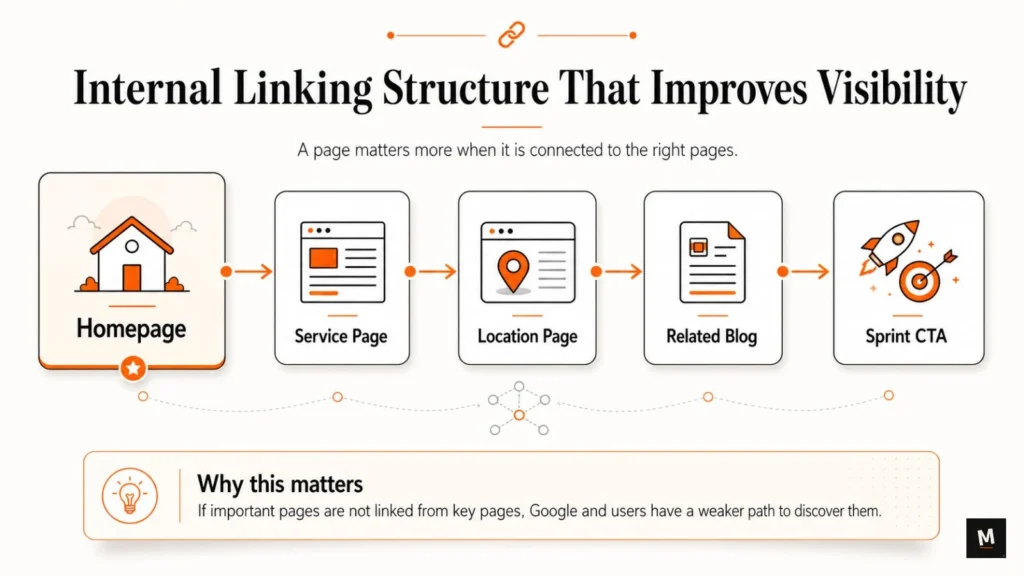
But if no other page links to it, Google and users have a weaker path to discover it.
For a service business, orphaned pages can kill visibility.
Example:
You have a page for “Luxury Interior Design Services in Dubai.”
But it is not linked from:
- homepage
- menu
- footer
- service page
- related blog posts
- location hub
Then why should Google treat that page as important?
What to check:
- Is the page linked from the homepage?
- Is it linked from the main service page?
- Is it linked from relevant blog posts?
- Is it listed in the menu or footer if important?
- Does it link back to related pages?
If a page matters for business but nothing links to it, you are making discovery harder.
Internal linking is not just an SEO tactic.
It is a visibility pathway.
8. Your Website Only Shows for Your Brand Name
This is common.
You search your brand name and your website appears.
Then you assume SEO is fine.
But when you search your actual service keyword, your website is nowhere.
That means Google knows your website exists, but may not understand or trust it enough for non-brand service queries.
Example:
Brand search: “ABC Interiors”
Non-brand search: “interior designer in Dubai”
Another example:
Brand search: “XYZ Dental”
Non-brand search: “dental clinic in London”
Showing for your brand name is not the same as ranking for buyer-intent keywords.
Brand visibility is basic.
Service visibility is where business growth starts.
What to check:
- Do you have dedicated service pages?
- Do you have location pages if relevant?
- Are page titles and H1s clear?
- Does the content explain the service deeply?
- Are related blogs linking to the service page?
- Does the page show proof?
- Does the page answer buyer questions?
If your website only shows for your brand name, your issue may not be indexing.
Your issue may be search clarity.
9. Your Service Pages Are Weak or Missing
Many service businesses rely too much on the homepage.
This is a mistake.
One homepage cannot rank for every service, location, and buyer-intent query.
A premium interior design studio cannot expect one homepage to rank for:
- luxury interior designer in Dubai
- villa interior design services
- apartment interior designer
- commercial interior design firm
- turnkey interior design company
- high-end residential interior design
Each service or market needs clear page support.
A good service page should explain:
- what the service is
- who it is for
- which location or market it serves
- what problem it solves
- how your process works
- what makes your approach different
- what proof you have
- what questions buyers ask
- what the next step is
A beautiful homepage cannot carry the entire SEO strategy.
If your service pages are weak, Google may not understand what you should rank for.
And serious buyers may not trust you enough to contact you.
This is where a clarity-first SEO approach matters.
For deeper diagnosis, you can explore the 14-Day SEO Visibility Sprint, which is built to identify what is actually blocking your Google visibility.
10. Your Content Is Too Generic
Google does not need another vague page saying:
“We provide quality services.”
That tells nothing.
Generic content does not help Google understand your business.
It also does not help buyers trust you.
Weak content sounds like this:
- “We offer best services”
- “Our team is experienced”
- “We deliver quality solutions”
- “Contact us for more information”
- “We are a leading company”
Better content answers real questions:
- What exactly do you offer?
- Who is this service best for?
- What problem do you solve?
- What does your process look like?
- What makes your approach different?
- What proof do you have?
- What should the buyer do next?
For service businesses, clarity is not optional.
If your content sounds like every competitor, Google has no strong reason to treat your page as more useful.
And your buyer has no strong reason to choose you.
11. Your Website Does Not Show Enough Trust Signals
Trust signals matter.
Not just for Google.
For buyers too.
If your competitors show proof and your website only makes claims, your competitors have the stronger page.
Trust signals include:
- reviews
- testimonials
- case studies
- portfolio
- founder details
- team details
- business address
- process explanation
- FAQs
- real project examples
- certifications
- media mentions
- before-after examples
- client logos where appropriate
A service page without proof feels incomplete.
A premium brand cannot rely only on beautiful visuals.
It also needs clear trust.
For example, an interior design studio should not only show attractive images.
It should explain:
- what type of projects it handles
- what cities it serves
- what design process it follows
- what clients say
- what problems it solves
- what project types it specializes in
- how someone can start a consultation
Good SEO is not just about keywords.
It is about helping Google and the buyer understand why your page deserves attention.
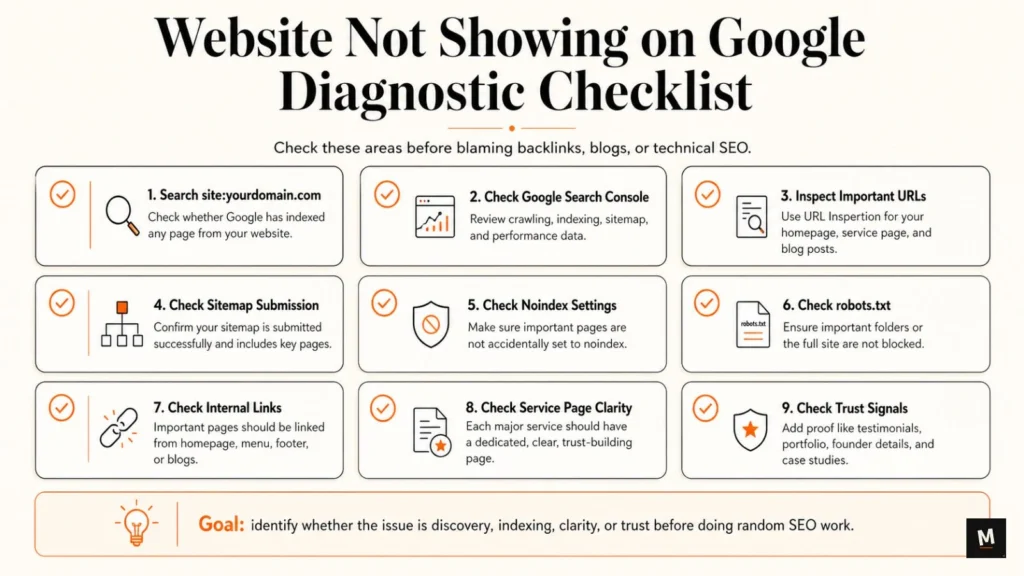
What to Check First If Your Website Is Not Showing on Google
Before you assume the problem is backlinks, blogs, or technical SEO, do this checklist.
- Search
site:yourdomain.com
This tells you whether Google has indexed any page from your website.
If nothing appears, Google may not have indexed your website yet.
- Check Google Search Console
Search Console shows crawling, indexing, sitemap, and performance data.
If you do not have it connected, connect it first.
- Inspect important URLs
Use the URL Inspection Tool for your homepage, main service page, and important blog posts.
Check whether the URL is on Google.
- Check sitemap submission
Go to Search Console and check whether your sitemap is submitted successfully.
If you use Rank Math, confirm your sitemap includes important pages.
- Check noindex settings
Check WordPress reading settings and Rank Math page-level robots settings.
Make sure important pages are not set to noindex.
- Check robots.txt
Open yourdomain.com/robots.txt.
Make sure important folders or the entire site are not blocked.
- Check whether important pages are internally linked
If your service pages are not linked from your homepage, menu, footer, or related blogs, fix that.
- Check service page clarity
Each important service should have a dedicated page.
The page should clearly explain what the service is, who it is for, and why someone should trust you.
- Check content depth
Thin pages rarely perform well.
Add useful explanations, buyer questions, examples, process, proof, and next steps.
- Check trust signals
Add testimonials, portfolio, founder details, business information, case studies, and real examples.
When You Should Stop Guessing and Get a Manual Review
Sometimes the basic checklist is enough.
Sometimes it is not.
You should consider a manual review if:
- your website is indexed but not ranking
- you only show for your brand name
- you are not sure whether the issue is technical or content-related
- you have service pages but no traffic
- competitors rank above you
- you keep publishing but nothing improves
- your pages look good but do not bring search visibility
- your website has no clear internal linking structure
- your content does not explain the business clearly
- you are unsure what to fix first
This is where random SEO work becomes expensive.
Publishing more blogs will not fix a noindex problem.
Building backlinks will not fix weak service pages.
Changing design will not fix poor search clarity.
The first step is diagnosis.
The 14-Day SEO Visibility Sprint is built for business owners who want to understand what is blocking their Google visibility and what to fix first.
It manually reviews discovery, indexing readiness, search clarity, service page strength, internal linking, and trust signals.
Final Takeaway
Your website may not be showing on Google because Google cannot discover it, index it, understand it, or trust it enough.
The fix is not always more blogs.
It is not always backlinks.
It is not always a redesign.
The first step is to identify the real blocker.
Start with the basics:
- Can Google find the website?
- Can Google crawl important pages?
- Are important pages indexed?
- Are pages blocked by noindex or robots.txt?
- Are important service pages internally linked?
- Does the content explain the business clearly?
- Does the website show enough proof and trust?
Once you know where the visibility chain is breaking, the next step becomes much clearer.
Use the free Website Not Showing on Google Scorecard to find where your visibility may be breaking.
FAQs
How long does it take for a new website to show on Google?
A new website can take a few days to a few weeks to appear on Google. Google recommends allowing at least a week after submitting a sitemap or indexing request before assuming there is a problem. But if your website is still not appearing after that, check sitemap submission, noindex settings, robots.txt, internal links, and Search Console errors.
How do I check if my website is indexed by Google?
Search this in Google: site:yourdomain.com
Replace yourdomain.com with your actual domain.
You can also use Google Search Console and inspect specific URLs using the URL Inspection Tool.
Why is my website showing for my brand name but not for service keywords?
This usually means Google knows your website exists, but your pages may not be strong enough for non-brand search queries.
You may need better service pages, clearer page titles, more detailed content, internal links, location targeting, and trust signals.
Can robots.txt stop my website from showing on Google?
Robots.txt can stop crawlers from accessing certain URLs, but Google says it is not the right way to keep pages out of search results. If another page links to a blocked URL, Google may still show the URL without full content. To keep a page out of Google, use noindex or password protection.
Can a noindex tag remove my page from Google?
Yes. A noindex tag tells search engines not to index the page. If an important page has noindex enabled by mistake, it may not appear in Google Search. Check WordPress settings and Rank Math page-level robots settings.
Should I create more blogs if my website is not showing on Google?
Not immediately.
First check discovery, indexing, noindex, robots.txt, sitemap, internal links, service page clarity, and trust signals.
More blogs will not fix a technical indexing problem or weak service page structure.
What should I do first if my website is not showing on Google?
Start with this order:
1. Search site:yourdomain.com
2. Check Google Search Console
3. Inspect important URLs
4. Check sitemap
5. Check noindex
6. Check robots.txt
7. Check internal links
8. Improve service page clarity
9. Add trust signals
10. Use the Website Not Showing on Google Scorecard