Most marketers are not short on tools. They are short on clean systems.
Research lives across five tabs. Content briefs stay half-finished. Repurposing turns into manual copy-paste. Reporting becomes a weekly mess. That is where Claude AI becomes useful for marketers.
Not as a magic writer. Not as a replacement for thinking. As a system tool that helps marketers process inputs faster, structure ideas better, and move from messy work to cleaner execution.
The real value is not “AI writes for me.” The real value is that Claude can remove repetitive effort across research, briefing, repurposing, analysis, and reporting.
Why Most Marketers Use AI the Wrong Way
Most marketers use AI in random bursts.
They open the tool, type a quick prompt, get an average output, and then either overtrust it or dismiss it. That is the wrong model.
The problem is usually one of these:
- random prompting with no workflow behind it
- treating output like final work instead of a working draft
- asking broad questions without enough context
- using AI to generate more words instead of better decisions
- skipping review, editing, and judgment
This is why some marketers say AI saves hours while others say it gives generic results. The difference is not just the tool. It is how the tool fits into a repeatable process.
Claude works best when you use it for structured support:
- turning raw research into useful synthesis
- transforming rough thoughts into usable briefs
- repackaging content without losing message clarity
- reducing time spent on repetitive first-pass work
Used this way, it becomes a leverage tool. Used randomly, it becomes just another tab.
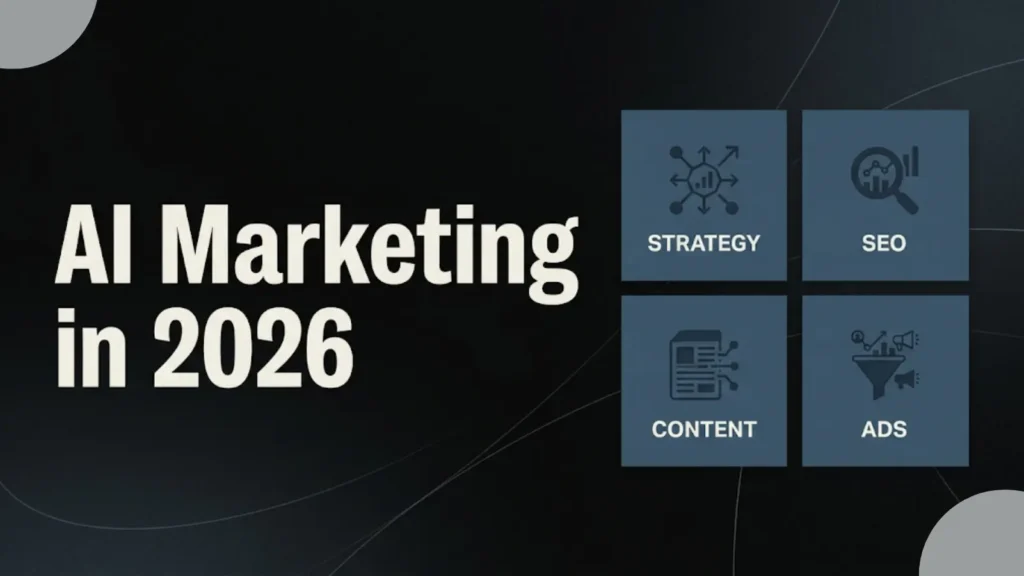
Read More:- AI Marketing in 2026: Complete Business Guide to Strategy, SEO, Content, and Ads
Claude Is Best For / Claude Is Not Best For
Claude is best for:
- research synthesis from messy inputs
- content brief creation
- repurposing one asset into multiple formats
- competitor messaging breakdowns
- summarizing meetings, notes, and strategy docs
- turning rough data notes into cleaner report drafts
Claude is not best for:
- publishing final copy without review
- making live paid media decisions
- replacing brand strategy or positioning work
- handling factual claims without verification
- owning client communication where nuance matters
- acting like an autonomous marketing operator
The simple rule: Claude is strongest when it helps structure thinking, not when it is trusted to replace it.
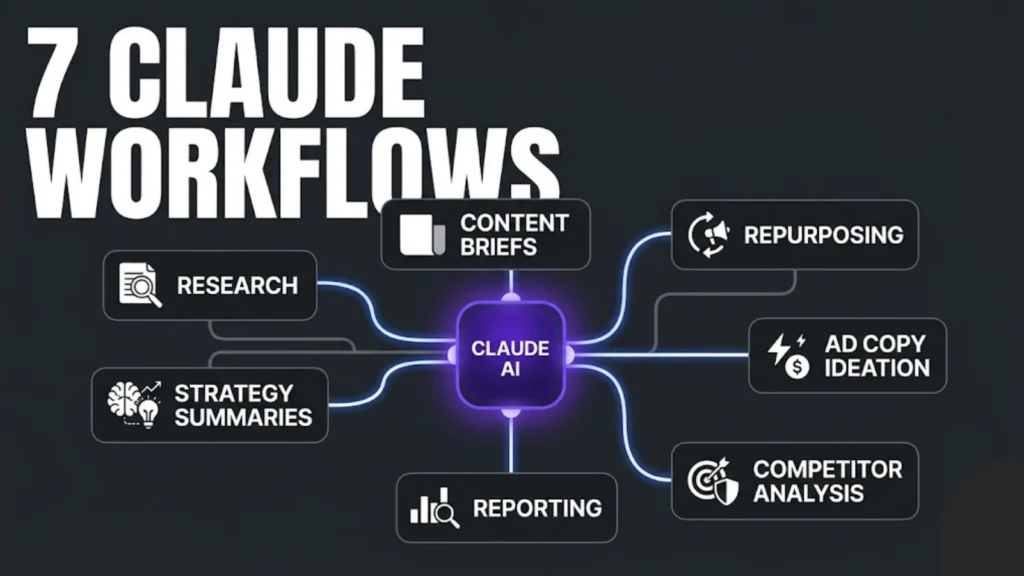
Workflow 1: Research Faster Without Getting Lost
Research is one of the clearest use cases for Claude, but most people still use it badly. They ask broad questions, get broad answers, and end up with polished nonsense.
The better workflow is to use Claude after collecting raw inputs.
The task
A marketer is researching a topic, market trend, audience pain point, or campaign angle. That usually means reading multiple pages, collecting notes, and trying to make sense of scattered information.
How Claude helps
Claude is strong at taking messy material and turning it into usable structure. For example, you can feed it:
- rough notes from multiple articles
- pasted competitor messaging
- customer interview takeaways
- sales objections
- campaign observations
Then ask it to extract:
- recurring themes
- angle opportunities
- objections
- content gaps
- strategic patterns
This is where Claude becomes practical for research and reporting. You are not asking it to “research everything.” You are asking it to organize what you already collected.
How to use the output
Use Claude’s output as a research map, not a source of truth. It can help you spot:
- what keeps repeating in the market
- where competitors sound similar
- which angles feel overused
- where a stronger content direction exists
Where human review is needed
You still need to verify claims, assess relevance, and decide what matters. Claude can reduce confusion, but it cannot replace market judgment.
Example prompt:
“Here are my notes from 6 articles, 3 competitor pages, and 12 customer objections. Organize them into recurring themes, repeated claims, overlooked angles, and content opportunities. Then show me where the market sounds generic.”
Workflow 2: Build Better Content Briefs in Less Time
A weak brief creates a weak article. This is one of the biggest content bottlenecks inside agencies, in-house teams, and solo workflows.
The task
A marketer has a topic idea but needs to turn it into something a writer can actually execute. That means defining:
- search intent
- audience
- angle
- structure
- key points
- FAQs
- CTA direction
How Claude helps
Claude can turn rough topic notes into a structured content brief much faster than doing it manually from scratch.
Let’s say your raw input is:
- topic: AI landing page optimization
- audience: SaaS marketers
- goal: traffic + leads
- angle: practical, no hype
- must include: testing, copy, UX, intent match
Claude can organize this into:
- working title options
- intro direction
- H2 structure
- must-cover points
- FAQ ideas
- internal linking suggestions
- what-to-avoid notes for the writer
This is one of the strongest Claude workflows because it improves downstream quality. A better brief leads to a better article, which reduces editing time later.
How to use the output
Do not pass the first draft of the brief straight to the writer. Tighten the angle. Remove generic sections. Add business context.
Where human review is needed
You still need to decide whether the brief is sharp enough, differentiated enough, and aligned with search intent. Claude can provide structure, but strategy still comes from the marketer.
Example prompt:
“Turn these notes into a content brief for a blog post targeting SaaS marketers. Include search intent, article angle, H2 structure, must-cover points, FAQs, internal linking ideas, and a short note on what the writer should avoid.”
Workflow 3: Repurpose One Piece of Content Into Multiple Formats
Repurposing sounds easy until teams actually do it. A blog becomes a LinkedIn post, then an email, then a short summary, and suddenly the messaging starts drifting.
The task
Take one core content asset and adapt it for multiple channels without losing consistency.
Common examples:
- blog to LinkedIn post
- blog to email newsletter
- blog to X thread or short-form text
- webinar notes to article summary
- long-form article to quick takeaways
How Claude helps
Claude is useful here because it can preserve the core message while changing format, length, and tone.
For example, you can ask it to:
- pull out the strongest insights from a blog
- rewrite them for a founder-style LinkedIn post
- turn the same article into a short email version
- create three summary versions for different audience awareness levels
This makes Claude more useful for content marketing than generic writing assistance. You are not asking it to invent new strategy every time. You are using it to extend the life of existing content.
How to use the output
Pick the strongest version, then refine it for channel fit. A LinkedIn post may need a stronger hook. An email may need a tighter CTA. A short summary may need more punch.
Where human review is needed
Brand voice and platform nuance still matter. Claude can help maintain structure and consistency, but you should still review tone, clarity, and audience fit before publishing.
Workflow 4: Generate Better Ad Copy Angles and Variations
AI should not replace paid media judgment. But it can reduce ideation fatigue.
The task
A marketer needs multiple ad angles for testing:
- different hooks
- different pain points
- different levels of awareness
- different audience segments
- different value propositions
How Claude helps
Claude can help expand one offer into multiple messaging directions. That is useful when your brain is stuck on one angle.
For example, if you are promoting a service or product, Claude can generate variations around:
- speed
- cost savings
- accuracy
- control
- simplicity
- risk reduction
- revenue upside
It can also restructure the same message for:
- cold audience
- problem-aware audience
- solution-aware audience
- retargeting audience
This is one of the more valuable marketing use cases because ad ideation usually slows down after the first few obvious angles.
How to use the output
Use Claude to create testing options, not final ads. Pull promising angles, then rewrite them with real brand tone and campaign context.
Where human review is needed
This is non-negotiable in paid media. Claims, compliance, platform fit, audience sensitivity, and conversion logic all need human oversight. Claude helps with ideation, not campaign accountability.
Workflow 5: Break Down Competitor Pages and Messaging
Marketers often review competitor pages manually, but the process gets slow when you want patterns instead of surface observations.
The task
Analyze landing pages, service pages, pricing pages, or product pages to understand:
- offer positioning
- CTA patterns
- promise structure
- trust signals
- differentiation gaps
- messaging repetition
How Claude helps
Paste competitor page copy or notes into Claude and ask it to break down:
- main value proposition
- primary audience
- emotional triggers
- CTA structure
- proof elements
- weak spots
- repeated claims
This is especially useful when you want more than “competitor says X.” You want to understand how they frame value and where they sound generic.
For marketers working on landing pages, campaigns, and offers, this becomes a real strategic shortcut. It helps you move from observation to message design faster.
How to use the output
Use the analysis to sharpen your positioning. You may notice:
- every competitor is promising speed
- no one is addressing implementation pain
- CTAs are weak and vague
- social proof is overused but not specific
- offers sound similar and interchangeable
That insight can shape better copy and better angles.
Where human review is needed
Claude can identify patterns, but it cannot decide your final positioning. That requires context about your brand, offer, margins, audience, and goals.
Workflow 6: Summarize Strategy, Meetings, or Large Inputs
A lot of marketing work gets buried inside long documents, meeting transcripts, and scattered internal notes.
The task
Turn long-form inputs into decision-ready summaries.
Examples:
- campaign review meetings
- strategy docs
- client call notes
- internal planning sessions
- large research dumps
- workshop transcripts
How Claude helps
Claude is strong with long-form inputs and restructuring. That makes it useful for marketers dealing with information overload.
You can use it to turn raw material into:
- key decisions
- unresolved questions
- action items
- strategic summaries
- next-step recommendations
- stakeholder-ready recaps
This is one of the clearest examples of how marketers use Claude in real work. The value is not in fancy output. The value is in helping teams move faster from discussion to execution.
How to use the output
Use the summary as a cleaned first version for internal alignment. It can help you send faster follow-ups, prepare strategy notes, or organize campaign direction.
Where human review is needed
You still need to confirm what was actually decided, what was implied, and what should be prioritized. Claude can simplify the input, but leadership still needs to make the call.
Workflow 7: Turn Raw Data or Notes Into Clear Reporting Support
Reporting is where a lot of marketers lose time. Not because the numbers are hard, but because turning numbers into useful language is repetitive and mentally draining.
The task
Take campaign performance notes, exported metrics, or rough observations and convert them into a report-friendly structure.
Typical tasks include:
- performance summary drafts
- trend observations
- what worked and what did not
- priority actions
- client-facing update structure
- monthly recap organization
How Claude helps
Claude can help turn messy data notes into readable insight drafts.
For example, you can provide:
- campaign metrics
- your rough notes
- comments from the team
- changes made during the period
Then ask Claude to structure the report into:
- top-level summary
- wins
- concerns
- likely reasons
- next actions
- questions to monitor
This makes Claude genuinely useful for agency and in-house teams that need cleaner reporting workflows.
How to use the output
Treat it as reporting support, not automated truth. It helps produce a strong first draft that you can refine quickly.
Where human review is needed
Interpretation still matters. Data context, causation, anomalies, attribution issues, and client sensitivity all require human judgment. Claude can improve clarity, but it cannot own the final narrative.
Example prompt:
“Here are campaign metrics and my rough notes from this month. Turn them into a reporting draft with a summary, wins, concerns, likely reasons, and next actions. Keep it clear, concise, and client-friendly without overstating results.”
Read More:- Best AI Marketing Tools for Content, SEO, and Ads
Where Claude Works Best for Marketers
Claude is most useful when the work involves processing, restructuring, and clarifying information.
It tends to work best for:
- research synthesis
- long-form note cleanup
- content brief creation
- repurposing existing assets
- first-pass strategic summaries
- messaging angle exploration
- reporting structure support
In short, Claude is strongest when the marketer already has raw material and needs speed plus structure.
That is the real answer to the Claude-for-marketers question. It is less about “Can Claude create marketing?” and more about “Where can Claude remove wasted effort from marketing workflows?”
Where Human Review Is Still Non-Negotiable
This is where marketers need discipline.
Claude can save time, but some things should never be handed over blindly.
Factual checks
If something involves numbers, research claims, competitor details, or industry specifics, verify it.
Brand voice
Claude can follow style direction, but it can still sound too smooth, too generic, or too safe. Final tone should still be shaped by a human.
Final strategic decisions
No AI tool should decide your positioning, budget priorities, offer direction, or channel strategy on its own.
Sensitive client communication
Client-facing messaging needs judgment, especially when performance is mixed, expectations are high, or nuance matters.
Live campaign decisions
Bid adjustments, audience exclusions, offer changes, scaling choices, and performance reactions all require real operator thinking.
AI can support decision-making. It should not replace accountability.
How to Build Your First Claude Workflow in 15 Minutes
If you want Claude to actually save time, do not start with a giant system. Start with one repeatable task.
Here is the simplest way to do it.
Step 1: Pick one task you do every week
Choose something repetitive, messy, and time-consuming.
Good examples:
- turning notes into content briefs
- repurposing blog content into LinkedIn posts
- summarizing meeting notes
- cleaning up report drafts
Do not start with five workflows. Start with one.
Step 2: Define the input clearly
Claude works better when the raw material is clear.
Your input might be:
- rough notes
- article draft
- meeting transcript
- performance notes
- competitor copy
- bullet points from research
If the input is messy, that is fine. But it still needs enough context.
Step 3: Tell Claude exactly what output you want
Do not ask, “Help me with this.”
Ask for a specific format.
For example:
- turn this into a content brief
- summarize this into action items
- repurpose this into a LinkedIn post and email version
- structure this into a client-friendly report draft
Specific tasks get better outputs.
Step 4: Add one quality rule
This is where the workflow gets stronger.
Add one or two rules like:
- keep it concise
- remove generic filler
- use a sharp, practical tone
- do not invent facts
- make it suitable for SaaS marketers
- keep the CTA soft, not pushy
This helps Claude stay closer to your actual working style.
Step 5: Review, refine, and save the prompt
Do not judge the workflow based on the first output alone.
Check:
- what part was useful
- what felt generic
- what instructions were missing
- what format should be improved
Then refine the prompt and save the working version.
That is your first real Claude workflow.
A simple starter prompt
“Here are my rough notes. Turn them into a clean content brief. Include the target audience, search intent, article angle, H2 structure, key points to cover, FAQs, and a short note on what to avoid. Keep it practical, clear, and non-generic.”
The goal
Your first Claude workflow does not need to be perfect.
It needs to do one thing well enough that it saves time every week.
That is how AI becomes useful in marketing. Not by doing everything. By removing friction from one repeatable task at a time.
Final Take: Claude Saves Time Only When You Use It Inside a System
Claude is useful for marketers, but only when it is used inside a clear workflow.
If you use it randomly, you will get random value.
If you use it as part of a system, it can help you:
- research faster
- brief better
- repurpose more consistently
- ideate more efficiently
- summarize more clearly
- report with less friction
That is the real leverage.
The mistake is treating Claude like a magic writer. The better approach is to treat it like a thinking assistant for repeatable marketing tasks.
The real value of AI in marketing is not faster prompting. It is building workflows that remove wasted effort.
If your team is still using AI randomly, you are getting outputs, not leverage.
Actionable Takeaways
Here is what marketers should do now:
- identify 3 to 5 weekly tasks that repeat every week
- insert Claude into the first-draft or restructuring stage of those tasks
- give it better inputs instead of broader prompts
- create mini workflows for research, briefs, repurposing, and reporting
- review every output before using it externally
- keep strategic judgment, brand voice, and factual checks human-led
That is how you turn AI from a novelty into a real operating advantage.
FAQs
What is Claude AI used for in marketing?
Claude can help marketers with research synthesis, content briefs, repurposing, ad angle ideation, competitor analysis, strategy summaries, and reporting support.
Can Claude AI write ad copy for marketers?
It can help generate hooks, angles, and copy variations for testing. But marketers should still review and refine the final ad copy before using it live.
Is Claude good for content briefs and repurposing?
Yes. It is especially useful for turning rough ideas into structured briefs and adapting one content asset into multiple channel-specific formats.
Can marketers use Claude for reporting and research?
Yes. Claude works well for summarizing large inputs, organizing messy notes, spotting patterns, and helping draft clearer report structures.
Does Claude replace human marketers?
No. Claude saves time when used inside a workflow, but strategy, judgment, factual checks, brand voice, and final decisions still require human review.